How to start an organization plan
How to manage your organization plan
How to access your organization plan
Roles in your organization plan
Available to the following roles in the Organization Plan:
- Organization Owner
Definition
An Organization Plan enables you to manage one predictable contract that grows with you. Instead of everyone managing a separate subscription, you get one place to add and remove people, organize them into teams, control who can do what, and handle a single annual bill. Features include:
- One subscription and one renewal date for the whole team, instead of many individual plans.
- A shared pool of seats you assign to people as your roster changes.
- Teams, so you can group people by office, region, or function.
- Roles, so the right people can manage users, content, and billing — and everyone else just gets to work.
Key Benefits
- Simplified Billing and Scaling: Consolidate multiple individual subscriptions into one predictable annual contract with a single renewal date, making it easy to grow your plan alongside your organization.
- Flexible Resource Sharing: Maximize your team's efficiency with a shared pool of user seats that can be reassigned as your roster changes, plus a communal pool of Property Tours and map activations.
- Centralized Team Management: Keep your organization structured by grouping users into teams (by office, region, or function) and assigning specific roles, ensuring administrators can control access and billing while everyone else focuses on their work.
How to start an organization plan
To learn more about the Organization Plan, contact our Sales team.
How to Manage Your Organization Plan
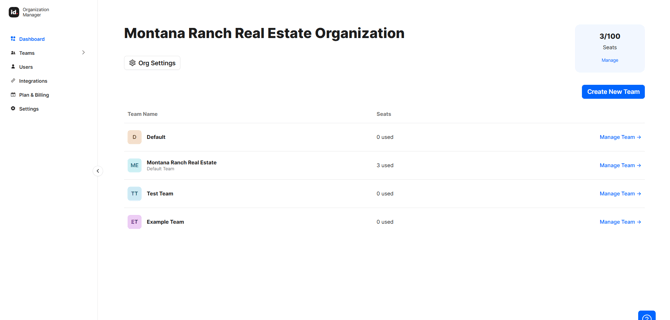
From your Organization Manager, you will see:
- Dashboard — your overview, with org-wide usage and your teams.
- Users — everyone in the Organization, in one list.
- Team pages — the people and stats for a single team.
- Plan & Billing — your subscription, seats, payment methods, and invoices.
- Settings —organization details, the default team, and ownership transfer.
How to Access Your organization plan
Roles in Your Organization Plan
Everyone in your Organization Plan has at least one role. A person can hold more than one role (e.g., a Team Admin who is also a Billing Contact).
- Owner — has full control of the Organization, including people, teams, content, billing, and settings. Only one person can be an owner at a time. Requires a seat.
- Team Admin — manages the people and content within their own team(s). Requires a seat.
- Billing Contact — can view and manage billing (plan, payment methods, invoices). Doesn’t need a seat, and doesn’t need to belong to a team.
- Standard — Typically, an agent, broker or marketing team member who uses Land id regularly. No admin access. Requires a seat.
How to understand Your Organization's Usage
The Dashboard, Users, and Team pages each show your used and total seats. Each user fills a seat, and you will need to purchase additional seats to add new users.