
How to change your payment method
How to access billing history and invoices
Availability within the Land id Organization Plan:
-
Organization Owner
- Billing Contact
Definition
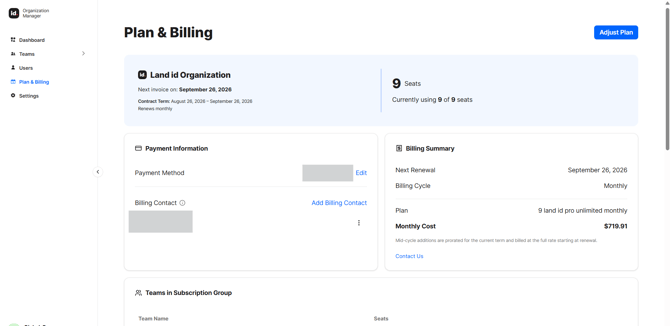
Plan & Billing is where you manage your subscription, adjust seats and activations, keep payment methods current, and find your invoices.
By managing your organization's billing, you can:
- Add new seats for new users
- Add new activations for their maps and Property Tours
- Change the billing information on file to ensure uninterrupted access
Your Organization is billed annually, with one renewal date for everything.
How to Add a Billing Contact
How to View Your Current Plan
To view your current plan, visit the "Plan and Billing" tab on the Organization Manager dashboard. Here, you can see your current seats and activations, your next renewal date, and the payment method on file. Owners, Team Admins, and Billing Contacts can all view plan and usage details.
Back to topHow to Adjust Your Plan
Add seats or activations
Adding seats or activations takes effect immediately. You can immediately invite a new user to the seat.
How Proration Works: When you add capacity mid-year, you only pay for the part of the year that’s left. So a seat or publish added halfway through your term costs about half its annual price now, then renews at the full rate on your renewal date.
Reduce seats or activations
Reducing seats and activations takes effect at your renewal date, not right away.
Caution: If you lower your seats below the number of people currently using them a LIFO policy is enacted on the renewal date. The most recently added users are deactivated.
To avoid this, deactivate users below your renewal date seat limit prior to the renewal date.
How to change your payment method
Your Organization always needs at least one payment method on file, so you can’t remove the last one.
Owners and Billing Contacts can manage payment methods.
Add, remove, or set a default payment method through our secure payment processor.
Warning: We attempt your renewal a week before your renewal date.
If it doesn’t go through, we notify the Owner and Billing Contacts and keep retrying for several days. Updating your payment method and completing the charge resolves it; if every attempt fails, Organization access is paused until billing is sorted out.
How to Access Billing History And Invoices
View your past invoices and receipts and download them as PDFs, and see your upcoming renewal date and amount.