---
title: Setting your Map's Launch View
description: Learn about Land id™ Launch View, including its benefits and how you can optimize how your Land id™ map first displays to your map viewers. Learn how to use the different launch views--3D tour, map view, video or panoramic photo.
---
[Skip to content](https://support.id.land/setting-your-maps-launch-view#main-content)
[](https://id.land/)
Open main navigation
Close main navigation
- [Contact Us](https://id.land/contact)
[Contact Us](https://id.land/contact)
How can we help you?
- There are no suggestions because the search field is empty.
1. [Land id Help Center](https://support.id.land/?hsLang=en)
2. [Product Tutorials](https://support.id.land/product-tutorials?hsLang=en)
3. [Using and Sharing Maps](https://support.id.land/product-tutorials?hsLang=en#using-and-sharing-maps)
# Setting your Map's Launch View
## Learn about Land id® Launch View, including its benefits. Learn how to optimize how your Land id map first displays to your map viewers and get tips on sharing your map with the 3D Tour.
[Availability](https://support.id.land/setting-your-maps-launch-view#availability)
[Definition](https://support.id.land/setting-your-maps-launch-view#definition)
[Key benefits](https://support.id.land/setting-your-maps-launch-view#key-benefits)
[How to set your different launch views](https://support.id.land/setting-your-maps-launch-view#how-to-use)
Available with any of the following [subscriptions](https://id.land/pricing):
- Land id Pro
- Land id Pro Unlimited
### Definition
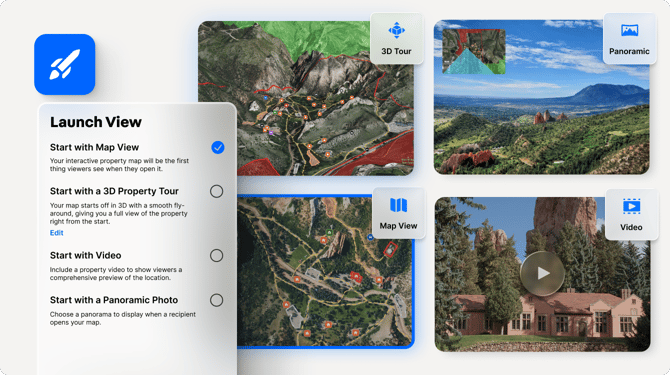
The Launch View feature enables you to control what your map viewers first see when they open your Share / Embed Map. You can set your launch view to *first* display in the following modes:
- Map View (2D)
- 3D Tour
- Video
- Panoramic Photo
Related: [Sharing Maps](https://support.id.land/sharing-maps?hsLang=en), [Embed Maps](https://support.id.land/embed-maps-on-your-website?hsLang=en), [Panoramic Photos](https://support.id.land/panoramic-images?hsLang=en), [Visualize Maps in 3D](https://support.id.land/visualize-maps-in-3d?hsLang=en)
[Back to top](https://support.id.land/setting-your-maps-launch-view#top)
### Key benefits
- Share immersive experiences that close deals faster
- Optimize your map to best showcase your property to your stakeholders
- Showcase slopes, contours, and boundaries in vivid detail with the 3D Tour
- Create unique presentations in under 2 minutes, keeping viewers engaged longer
- Stand out from competitors just using screenshots
**Limitation:** Launch View settings are only available on the desktop version of Land id.
If you're sharing maps from the mobile app, the Launch View automatically defaults to the Map View.
[Back to top](https://support.id.land/setting-your-maps-launch-view#top)
### How to set your different launch views
There are different launch views. Learn how to set each one:
- [Start with Map View](https://support.id.land/setting-your-maps-launch-view#start-map-view)
- [Start with 3D Tour](https://support.id.land/setting-your-maps-launch-view#start-3d-tour)
- [Start with Video](https://support.id.land/setting-your-maps-launch-view#start-video)
- [Start with Panaromic Photo](https://support.id.land/setting-your-maps-launch-view#start-pano-photo)
### Start with Map View (desktop)
[Back to top](https://support.id.land/setting-your-maps-launch-view#top)
### Start with 3D Tour (desktop)
[Back to top](https://support.id.land/setting-your-maps-launch-view#top)
### Start with Video (desktop)
[Back to top](https://support.id.land/setting-your-maps-launch-view#top)
### Start with a Panoramic Photo (desktop)
[Back to top](https://support.id.land/setting-your-maps-launch-view#top)
- [Get Started](https://support.id.land/get-started?hsLang=en)
- [Product Tutorials](https://support.id.land/product-tutorials?hsLang=en#main-content)
- [Property Information](https://support.id.land/product-tutorials?hsLang=en#property-information)
- [Map Creation](https://support.id.land/product-tutorials?hsLang=en#map-creation)
- [Using and Sharing Maps](https://support.id.land/product-tutorials?hsLang=en#using-and-sharing-maps)
- [Marketing Properties Training](https://support.id.land/marketing-properties-training?hsLang=en)
- [Organization Plan](https://support.id.land/organization-plan?hsLang=en)
- [Billing and Subscription](https://support.id.land/billing-and-subscription?hsLang=en)
- [Troubleshooting](https://support.id.land/troubleshooting?hsLang=en)
- [Partnership](https://support.id.land/partnership?hsLang=en)
- [Legal](https://support.id.land/legal?hsLang=en)
Copyright © 2025, Land id®