---
title: Manage Land Id Personal And Organization Accounts
description: Learn how to operate a personal account and organization account on Land id simultaneously.
---
[Skip to content](https://support.id.land/manage-both-individual-and-organization-accounts#main-content)
[](https://id.land/)
Open main navigation
Close main navigation
- [Contact Us](https://id.land/contact)
[Contact Us](https://id.land/contact)
How can we help you?
- There are no suggestions because the search field is empty.
1. [Land id Help Center](https://support.id.land/?hsLang=en)
2. [Organization Plan](https://support.id.land/organization-plan?hsLang=en)
# Manage Land Id Personal And Organization Accounts
## Learn how to operate a personal account and organization account on Land id simultaneously.
[Availability](https://support.id.land/manage-both-individual-and-organization-accounts#availability)
[Definition](https://support.id.land/manage-both-individual-and-organization-accounts#definition)
[How Payment Works with Multiple Accounts](https://support.id.land/manage-both-individual-and-organization-accounts#payment)
[How Content Ownership Works with Multiple Accounts](https://support.id.land/manage-both-individual-and-organization-accounts#content)
[How to Manage Multiple Accounts](https://support.id.land/manage-both-individual-and-organization-accounts#management)
Available to the following roles in the Organization Plan:
- Organization Owner
- Team Admin
- Standard User
### definition
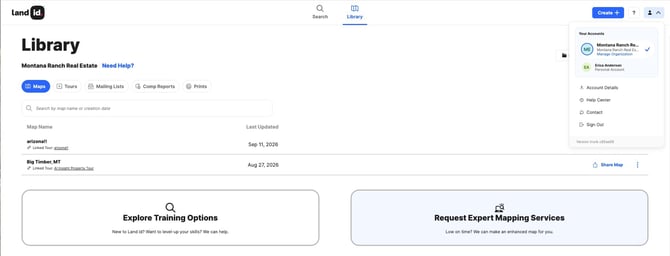
Your email address is the basis for your Land id accounts. You can have a personal Land id *and* Organization account(s) associated to your email address, specifically:
- One personal Land id subscription of any plan level–Land id, Land id Premium, or Land id Pro.
- Multiple Organization Accounts
If you have already subscribed to Land id and are invited to join an Organization Plan, this article will cover considerations for having two accounts and how to manage them.
This feature allows you to maintain ownership over your Land id maps and Property Tours, regardless of your association with organizations that you work with.
[Back to top](https://support.id.land/manage-both-individual-and-organization-accounts#top)
### **How Payment Works When You Have Multiple Accounts**
- The organization that invited you to join their Land id Organization Account pays for your organization account costs.
- If you maintain a separate, personal subscription to Land id, you pay for your personal account costs.
[Back to top](https://support.id.land/manage-both-individual-and-organization-accounts#top)
### **How Content Ownership Works when You have Multiple Accounts**
- The organization owns any content (e.g., maps, property tours) that you create in their Land id Organization Account. When you leave the organization, you will lose access to their content.
- You own any content (e.g., maps, property tours) created within your personal Land id account. If you leave the organization, you still own and can access this content.
**Tip:** Create maps and tours in the Land id Account the project is related to. For example, if you are working on a personal projects, you should create them in your personal Land id account that isn't associated to your organization.
[Back to top](https://support.id.land/manage-both-individual-and-organization-accounts#top)
### **How to Manage Multiple Accounts**
If you are already using a personal Land id subscription and you are invited to an Organization Account, you can choose to:
- [Keep and pay for your personal account](https://support.id.land/manage-both-individual-and-organization-accounts#keep-pay)
- [Transfer content to your organization account and then cancel your personal account](https://support.id.land/manage-both-individual-and-organization-accounts#transfer-cancel)
- [Cancel your personal account](https://support.id.land/manage-both-individual-and-organization-accounts#cancel)
[Back to top](https://support.id.land/manage-both-individual-and-organization-accounts#top)
#### Keep and pay for your personal account
Ask the person who invited you to send a new invite to your personal email address. This will let you join the Organization's Account with your personal email and maintain access to your personal account.
**Caution:** If you use separate email addresses for your personal account and organization account, you will have two separate Land id logins.
[Back to top](https://support.id.land/manage-both-individual-and-organization-accounts#top)
#### Transfer content to your Organization Account and then cancel your personal account
- **If you are using a different email for your new Organization Account**, you can [transfer the maps](https://support.id.land/transfer-maps-and-folders?hsLang=en) from your personal account to the new account.
- **If you are using the same email for your Organization Account as your personal account**, please [contact Support](https://support.id.land/options-for-contacting-support?hsLang=en) to transfer ownership of your maps and Property Tours.
- Once you have transferred your Land id content, you can [cancel your personal subscription.](https://support.id.land/cancel-my-subscription?hsLang=en)
- [Back to top](https://support.id.land/manage-both-individual-and-organization-accounts#top)
#### Cancel your personal account
If you don't mind losing access to Land id content in your personal account, you can simply [cancel your personal subscription.](https://support.id.land/cancel-my-subscription?hsLang=en)
[Back to top](https://support.id.land/manage-both-individual-and-organization-accounts#top)
- [Get Started](https://support.id.land/get-started?hsLang=en)
- [Product Tutorials](https://support.id.land/product-tutorials?hsLang=en#main-content)
- [Property Information](https://support.id.land/product-tutorials?hsLang=en#property-information)
- [Map Creation](https://support.id.land/product-tutorials?hsLang=en#map-creation)
- [Using and Sharing Maps](https://support.id.land/product-tutorials?hsLang=en#using-and-sharing-maps)
- [Marketing Properties Training](https://support.id.land/marketing-properties-training?hsLang=en)
- [Organization Plan](https://support.id.land/organization-plan?hsLang=en)
- [Billing and Subscription](https://support.id.land/billing-and-subscription?hsLang=en)
- [Troubleshooting](https://support.id.land/troubleshooting?hsLang=en)
- [Partnership](https://support.id.land/partnership?hsLang=en)
- [Legal](https://support.id.land/legal?hsLang=en)
Copyright © 2025, Land id®